QNAP
TS-EC2480U
Art.nr: TS-EC2480U
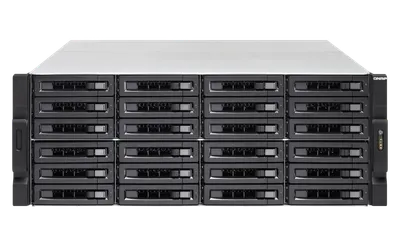
Specifikationer
Produktsida- Typ
- NAS
- Vikt
- 23.08 kg
- Kylning
- 4 x 8 cm smart cooling fan
- Kontroller
- Intel Xeon E3-1200 v3 Family 3.4 GHz Quad Core Processor
- Dimensioner
- 176.15 (H) 442.5 (W) 530.5(D) mm 6.94 (H) 17.42 (W) 20.89(D) inch
- 3.5"-fack
- 24
- Ethernet-portar
- 2
- Värdanslutning
- Ethernet
- Max Ethernet-hastighet
- 10 Gbps
Övriga specifikationer
- 1.
- Power Button 5. Gigabit LAN x 4
- 2.
- LED Indicators: 10 GbE, Status, LAN, Storage Expansion Port Status 6. USB 3.2 Gen 1 Port x 4
- 3.
- Password & Network Settings Reset Button 7. Left slot: PCIe Gen.3 x 8 Right slot: PCIe Gen.3 x 4 (This PCIe slot is an open-edge design. It can be used with a Gen.3 x 8 card.)
- 4.
- USB 2.0 Port x 4 8. Power Connector
- USB
- 4x USB 3.2 Gen 1 port (rear) 4x USB 2.0 port (rear) Support USB printer, pen drive, USB hub, and USB UPS etc.
- Memory
- System memory: 4 GB DDR3 ECC RAM Memory module pre-installed: 4 GB x1 Total memory slots: 4 Memory expandable up to: 32 GB (8GB x4) Note: When upgrading RAM to more than 28GB, the original 4GB RAM modules must be removed. For the information of RAM module installation and compatible NAS models, please refer to the QNAP RAM Module Installation Guide
- Buttons
- System: Power button and reset button
- LAN Port
- 4 x Gigabit RJ-45 Ethernet port (Expandable up to 8 x 1 Gb LAN or 4 x 10 Gb + 4 x 1 Gb LAN by installing optional dual-port 10 Gb and 1 Gb network card) Note: 1. For the optional network card compatibility list, please visit Compatibility list of Expansion Card 2. For the information of network card installation, please refer to chapter 6 in the Turbo NAS Hardware Manual.
- PCIe Slot
Priser hos återförsäljare
| Butik | Logotyp | Pris | Lager | |
|---|---|---|---|---|
| Inga aktuella priser tillgängliga. | ||||
Recensioner
Laddar recensioner…